September 2015

The 21st Century Paranoid Hermit

I’ve been doing a bit of thinking on my ride this morning.  A few weeks ago, a school student in the US decided to use his interest in electronics and his knowledge to make a digital clock.  Having gotten the circuit working, he decided to bring the device to school to show his physics teacher.

The physics teacher might not have been alarmed, but another certainly was, and he was frogmarched to the Principal’s office who then called the police.  It was a major uproar, and shows just how paranoid a society (globally) we’ve become.

Back in 2001, I used to have a portable CD player which I’d listen to on my commutes to and from school.  It was a basic affair, that took 4 AA cells that were forever going flat.  I tried rechargeable cells, but wasn’t satisfied with their life either.  Having gotten fed up with that, I looked to alternatives.  The alternative I went for was a small 12V 7Ah SLA battery about the size of a house brick.

Yes, heavy, but I carried it in the backpack with my textbooks, and it worked well.  I could go a week on a single charge.  In addition, I could run not just a CD player, but any 12V device, including a small fan, which made me the envy of a lot of fellow students in the middle of summer.  (Our classrooms were not air conditioned.)  I still use a cigarette lighter extension lead/4-way adapter that I made back then to give me extra sockets on the bicycle.

If I tried it today, I half expect I’d be explaining this to the AFP.

It raises a real serious question about what our future generations are meant to do with their lives.  Yes, there’s clearly a danger in experimenting with these things.  That SLA battery, if it ruptured, could leak highly dangerous sulphuric acid.  If I charge it or discharge it too fast (e.g. by shorting the terminals), the internal resistance would build up heat inside the cells which would then start boiling the water in the electrolyte and gas would build up, possibly triggering the cell walls to fail.

But, I had contingency plans.  The battery was set up with fuses to cut power in the event of a short.  Cables were well insulated.  Terminals were protected.  It never caused an issue.  These days, I use LiFePO4s, which, while forgiving, also have their dangers.  I steer clear of LiPol cells since they are very volatile.

The point being, I had been experimenting with electronics from a very young age.  I also learned about computer programming from a very young age.  I learned about how they worked, and learned how to control them.  You could compare it to learning to ride a horse.

One [way] is to get on him and learn by actual practice how each motion and trick may be best met; the other is to sit on a fence and watch the beast a while, and then retire to the house and at leisure figure out the best way of overcoming his jumps and kicks.  The latter system is the safest, but the former, on the whole, turns out the larger proportion of good riders.

— Wilbur Wright in his speech “Some Aeronautical Experiments”, 18th September, 1901.
(source: David McCullough, “The Wright Brothers: The Dramatic Story-Behind-the-Story”)

I learned to ride a couple of “horses”.  One in particular, was the computer.  Understanding the electronics behind it greatly helped here.  I was already familiar with the concept of DC current by the time I hit university and I was well advanced in my understanding of how to control a computer.  What University specifically taught me was some discipline in how to structure code and the specifics of particular languages.  The bulk of my study was done long before I applied for any degrees.

There seems to be a thinking in today’s society that “task X is difficult, leave it to the professionals”.  There are some fields, where one would do well to heed that advice.  Anything involving gas ducting or mains electricity being two examples.

You can possibly get quite a bit of plumbing work done yourself, however some professional oversight is usually a good idea.  You have a right to DIY in most cases, but rights come with responsibilities, and one is taking responsibility of something goes wrong.  They go together.

(Extra) Low voltage, at low current levels, there’s very little you can actually do that would result in serious harm.  If you go about things carefully in a controlled manner, this experimentation can be a great vehicle for serious study in a chosen field.  Computers, unless you’re doing something really risky like flashing boot firmware, are not easily “bricked” and can be recovered.  Playing with a second-hand old desktop (not a production machine) or a cheap machine like the plethora of ARM-based and AVR-based single-board computers available today is not likely to result in life-threatening injury.

Banning the experimentation in such fields is not going to serve our community in the long term.  This is a typical knee-jerk reaction when someone’s experimentation is seen to be doing harm, even if, like the US student’s case, the experimentation is completely benign.  Following this road over time is only going to leave to a nation of cave-dwelling hermits that shun technology as black magic.

Technology is mankind’s genie, you cannot simply stuff it back in the bottle.  The genie here is quite willing to grant us many wishes, but unlike the ones of myths and legends, this one expects some effort to be done in return.  It is not simply going to vanish just because we’ve decided that it’s too dangerous.  We as individuals either need to study how the genie operates, or we pay someone else that has studied how it operates.  If everyone chooses to do the latter, who is left to do the former?

Implementing EEPROM emulation on the SM1000

Well, lately I’ve been doing a bit of work hacking the firmware on the Rowetel SM1000 digital microphone.  For those who don’t know it, this is a hardware (microcontroller) implementation of the FreeDV digital voice mode: it’s a modem that plugs into the microphone/headphone ports of any SSB-capable transceiver and converts FreeDV modem tones to analogue voice.

I plan to set this unit of mine up on the bicycle, but there’s a few nits that I had.

  • There’s no time-out timer
  • The unit is half-duplex

If there’s no timeout timer, I really need to hear the tones coming from the radio to tell me it has timed out.  Others might find a VOX feature useful, and there’s active experimentation in the FreeDV 700B mode (the SM1000 currently only supports FreeDV 1600) which has been very promising to date.

Long story short, the unit needed a more capable UI, and importantly, it also needed to be able to remember settings across power cycles.  There’s no EEPROM chip on these things, and while the STM32F405VG has a pin for providing backup-battery power, there’s no battery or supercapacitor, so the SM1000 forgets everything on shut down.

ST do have an application note on their website on precisely this topic.  AN3969 (and its software sources) discuss a method for using a portion of the STM32’s flash for this task.  However, I found their “license” confusing.  So I decided to have a crack myself.  How hard can it be, right?

There’s 5 things that a virtual EEPROM driver needs to bear in mind:

  • The flash is organised into sectors.
  • These sectors when erased contain nothing but ones.
  • We store data by programming zeros.
  • The only way to change a zero back to a one is to do an erase of the entire sector.
  • The sector may be erased a limited number of times.

So on this note, a virtual EEPROM should aim to do the following:

  • It should keep tabs on what parts of the sector are in use.  For simplicity, we’ll divide this into fixed-size blocks.
  • When a block of data is to be changed, if the change can’t be done by changing ones to zeros, a copy of the entire block should be written to a new location, and a flag set (by writing zeros) on the old block to mark it as obsolete.
  • When a sector is full of obsolete blocks, we may erase it.
  • We try to put off doing the erase until such time as the space is needed.

Step 1: making room

The first step is to make room for the flash variables.  They will be directly accessible in the same manner as variables in RAM, however from the application point of view, they will be constant.  In many microcontroller projects, there’ll be several regions of memory, defined by memory address.  This comes from the datasheet of your MCU.

An example, taken from the SM1000 firmware, prior to my hacking (stm32_flash.ld at r2389):

/* Specify the memory areas */
MEMORY
{
  FLASH (rx)      : ORIGIN = 0x08000000, LENGTH = 1024K
  RAM (rwx)       : ORIGIN = 0x20000000, LENGTH = 128K
  CCM (rwx)       : ORIGIN = 0x10000000, LENGTH = 64K
}

The MCU here is the STM32F405VG, which has 1MB of flash starting at address 0x08000000. This 1MB is divided into (in order):

  • Sectors 0…3: 16kB starting at 0x08000000
  • Sector 4: 64kB starting at 0x0800c000
  • Sector 5 onwards: 128kB starting at 0x08010000

We need at least two sectors, as when one fills up, we will swap over to the other. Now it would have been nice if the arrangement were reversed, with the smaller sectors at the end of the device.

The Cortex M4 CPU is basically hard-wired to boot from address 0, the BOOT pins on the STM32F4 decide how that gets mapped. The very first few instructions are the interrupt vector table, and it MUST be the thing the CPU sees first. Unless told to boot from external memory, or system memory, then address 0 is aliased to 0x08000000. i.e. flash sector 0, thus if you are booting from internal flash, you have no choice, the vector table MUST reside in sector 0.

Normally code and interrupt vector table live together as one happy family. We could use a couple of 128k sectors, but 256k is rather a lot for just an EEPROM storing maybe 1kB of data tops. Two 16kB sectors is just dandy, in fact, we’ll throw in the third one for free since we’ve got plenty to go around.

However, the first one will have to be reserved for the interrupt vector table that will have the space to itself.

So here’s what my new memory regions look like (stm32_flash.ld at 2390):

/* Specify the memory areas */
MEMORY
{
  /* ISR vectors *must* be placed here as they get mapped to address 0 */
  VECTOR (rx)     : ORIGIN = 0x08000000, LENGTH = 16K
  /* Virtual EEPROM area, we use the remaining 16kB blocks for this. */
  EEPROM (rx)     : ORIGIN = 0x08004000, LENGTH = 48K
  /* The rest of flash is used for program data */
  FLASH (rx)      : ORIGIN = 0x08010000, LENGTH = 960K
  /* Memory area */
  RAM (rwx)       : ORIGIN = 0x20000000, LENGTH = 128K
  /* Core Coupled Memory */
  CCM (rwx)       : ORIGIN = 0x10000000, LENGTH = 64K
}

This is only half the story, we also need to create the section that will be emitted in the ELF binary:

SECTIONS
{
  .isr_vector :
  {
    . = ALIGN(4);
    KEEP(*(.isr_vector))
    . = ALIGN(4);
  } >FLASH

  .text :
  {
    . = ALIGN(4);
    *(.text)           /* .text sections (code) */
    *(.text*)          /* .text* sections (code) */
    *(.rodata)         /* .rodata sections (constants, strings, etc.) */
    *(.rodata*)        /* .rodata* sections (constants, strings, etc.) */
    *(.glue_7)         /* glue arm to thumb code */
    *(.glue_7t)        /* glue thumb to arm code */
	*(.eh_frame)

    KEEP (*(.init))
    KEEP (*(.fini))

    . = ALIGN(4);
    _etext = .;        /* define a global symbols at end of code */
    _exit = .;
  } >FLASH…

There’s rather a lot here, and so I haven’t reproduced all of it, but this is the same file as before at revision 2389, but a little further down. You’ll note the .isr_vector is pointed at the region called FLASH which is most definitely NOT what we want. The image will not boot with the vectors down there. We need to change it to put the vectors in the VECTOR region.

Whilst we’re here, we’ll create a small region for the EEPROM.

SECTIONS
{
  .isr_vector :
  {
    . = ALIGN(4);
    KEEP(*(.isr_vector))
    . = ALIGN(4);
  } >VECTOR


  .eeprom :
  {
    . = ALIGN(4);
    *(.eeprom)         /* special section for persistent data */
    . = ALIGN(4);
  } >EEPROM


  .text :
  {
    . = ALIGN(4);
    *(.text)           /* .text sections (code) */
    *(.text*)          /* .text* sections (code) */

THAT’s better! Things will boot now. However, there is still a subtle problem that initially caught me out here. Sure, the shiny new .eeprom section is unpopulated, BUT the linker has helpfully filled it with zeros. We cannot program zeroes back into ones! Either we have to erase it in the program, or we tell the linker to fill it with ones for us. Thankfully, the latter is easy (stm32_flash.ld at 2395):

  .eeprom :
  {
    . = ALIGN(4);
    KEEP(*(.eeprom))   /* special section for persistent data */
    . = ORIGIN(EEPROM) + LENGTH(EEPROM) - 1;
    BYTE(0xFF)
    . = ALIGN(4);
  } >EEPROM = 0xff

Credit: Erich Styger

We have to do two things. One, is we need to tell it that we want the region filled with the pattern 0xff. Two, we need to make sure it gets filled with ones by telling the linker to write one as the very last byte. Otherwise, it’ll think, “Huh? There’s nothing here, I won’t bother!” and leave it as a string of zeros.

Step 2: Organising the space

Having made room, we now need to decide how to break this data up.  We know the following:

  • We have 3 sectors, each 16kB
  • The sectors have an endurance of 10000 program-erase cycles

Give some thought as to what data you’ll be storing.  This will decide how big to make the blocks.  If you’re storing only tiny bits of data, more blocks makes more sense.  If however you’ve got some fairly big lumps of data, you might want bigger blocks to reduce overheads.

I ended up dividing the sectors into 256-byte blocks.  I figured that was a nice round (binary sense) figure to work with.  At the moment, we have 16 bytes of configuration data, so I can do with a lot less, but I expect this to grow.  The blocks will need a header to tell you whether or not the block is being used.  Some checksumming is usually not a bad idea either, since that will clue you in to when the sector has worn out prematurely.  So some data in each block will be header data for our virtual EEPROM.

If we don’t care about erase cycles, this is fine, we can just make all blocks data blocks, however it’d be wise to track this, and avoid erasing and attempting to use a depleted sector, so we need somewhere to track this.  256 bytes gives us enough space to stash an erase counter and a map of what blocks are in use within that sector.

So we’ll reserve the first block in the sector to act as this index for the entire sector.  This gives us enough room to have 16-bits worth of flags for each block stored in the index.  That gives us 63 blocks per sector for data use.

It’d be handy to be able to use this flash region for a few virtual EEPROMs, so we’ll allocate some space to give us a virtual ROM ID.  It is prudent to do some checksumming, and the STM32F4 has a CRC32 module, so in that goes, and we might choose to not use all of a block, so we should throw in a size field (8 bits, since the size can’t be bigger than 255).  If we pad this out a bit to give us a byte for reserved data, we get a header with the following structure:

15 14 13 12 11 10 19 8 7 6 5 4 3 2 1 0
+0 CRC32 Checksum
+2
+4 ROM ID Block Index
+6 Block Size Reserved

So that subtracts 8 bytes from the 256 bytes, leaving us 248 for actual program data. If we want to store 320 bytes, we use two blocks, block index 0 stores bytes 0…247 and has a size of 248, and block index 1 stores bytes 248…319 and has a size of 72.

I mentioned there being a sector header, it looks like this:

15 14 13 12 11 10 19 8 7 6 5 4 3 2 1 0
+0 Program Cycles Remaining
+2
+4
+6
+8 Block 0 flags
+10 Block 1 flags
+12 Block 2 flags

No checksums here, because it’s constantly changing.  We can’t re-write a CRC without erasing the entire sector, we don’t want to do that unless we have to.  The flags for each block are currently allocated accordingly:

15 14 13 12 11 10 19 8 7 6 5 4 3 2 1 0
+0 Reserved In use

When the sector is erased, all blocks show up as having all flags set as ones, so the flags is considered “inverted”.  When we come to use a block, we mark the “in use” bit with a zero, leaving the rest as ones.  When we erase, we mark the entire flags block as zeros.  We can set other bits here as we need for accounting purposes.

Thus we have now a format for our flash sector header, and for our block headers.  We can move onto the algorithm.

Step 3: The Code

This is the implementation of the above ideas.  Our code needs to worry about 3 basic operations:

  • reading
  • writing
  • erasing

This is good enough if the size of a ROM image doesn’t change (normal case).  For flexibility, I made my code so that it works crudely like a file, you can seek to any point in the ROM image and start reading/writing, or you can blow the whole thing away.

Constants

It is bad taste to leave magic numbers everywhere, so constants should be used to represent some quantities:

  • VROM_SECT_SZ=16384:
    The virtual ROM sector size in bytes.  (Those watching Codec2 Subversion will note I cocked this one up at first.)
  • VROM_SECT_CNT=3:
    The number of sectors.
  • VROM_BLOCK_SZ=256:
    The size of a block
  • VROM_START_ADDR=0x08004000:
    The address where the virtual ROM starts in Flash
  • VROM_START_SECT=1:
    The base sector number where our ROM starts
  • VROM_MAX_CYCLES=10000:
    Our maximum number of program-erase cycles

Our programming environment may also define some, for example UINTx_MAX.

Derived constants

From the above, we can determine:

  • VROM_DATA_SZ = VROM_BLOCK_SZ – sizeof(block_header):
    The amount of data per block.
  • VROM_BLOCK_CNT = VROM_SECT_SZ / VROM_BLOCK_SZ:
    The number of blocks per sector, including the index block
  • VROM_SECT_APP_BLOCK_CNT = VROM_BLOCK_CNT – 1
    The number of application blocks per sector (i.e. total minus the index block)

CRC32 computation

I decided to use the STM32’s CRC module for this, which takes its data in 32-bit words.  There’s also the complexity of checking the contents of a structure that includes its own CRC.  I played around with Python’s crcmod module, but couldn’t find some arithmetic that would allow it to remain there.

So I copy the entire block, headers and all to a temporary copy (on the stack), set the CRC field to zero in the header, then compute the CRC. Since I need to read it in 32-bit words, I pack 4 bytes into a word, big-endian style. In cases where I have less than 4 bytes, the least-significant bits are left at zero.

Locating blocks

We identify each block in an image by the ROM ID and the block index.  We need to search for these when requested, as they can be located literally anywhere in flash.  There are probably cleverer ways to do this, but I chose the brute force method.  We cycle through each sector and block, see if the block is allocated (in the index), see if the checksum is correct, see if it belongs to the ROM we’re looking for, then look and see if it’s the right index.

Reading data

To read from the above scheme, having been told a ROM ID (rom), start offset and a size, the latter two being in byte sand given a buffer we’ll call out, we first need to translate the start offset to a sector and block index and block offset.  This is simple integer division and modulus.

The first and last blocks of our read, we’ll probably only read part of.  The rest, we’ll read entire blocks in.  The block offset is only relevant for this first block.

So we start at the block we calculate to have the start of our data range.  If we can’t find it, or it’s too small, then we stop there, otherwise, we proceed to read out the data.  Until we run out of data to read, we increment the block index, try to locate the block, and if found, copy its data out.

Writing and Erasing

Writing is a similar affair.  We look for each block, if we find one, we overwrite it by copying the old data to a temporary buffer, copy our new data in over the top then mark the old block as obsolete before writing the new one out with a new checksum.

Trickery is in invoking the wear levelling algorithm on an as-needed basis.  We mark a block obsolete by setting its header fields to zero, but when we run out of free blocks, then we go looking for sectors that are full of obsolete blocks waiting to be erased.  When we encounter a sector that has been erased, we write a new header at the start and proceed to use its first data block.

In the case of erasing, we don’t bother writing anything out, we just mark the blocks as obsolete.

Implementation

The full C code is in the Codec2 Subversion repository.  For those who prefer Git, I have a git-svn mirror (yes, I really should move it off that domain).  The code is available under the Lesser GNU General Public License v2.1 and may be ported to run on any CPU you like, not just ST’s.

Chip Manufacturer shenanigans

Well, a little nit I have to pick with chip manufacturers. On this occasion, it’s with ST, but they all do it, Freescale, TI, Atmel…

I’m talking about the assumptions they make about who uses their site.

Yes, I work as a “systems engineer” (really, programmer and network administrator, my role is more IT than Engineering).  However, when I’m looking at chip designs and application notes, that is usually in my recreation.

This morning, I had occasion to ask ST a question about one of their application notes.  Specifically AN3969, which deals with emulating an EEPROM using the in-built flash on a STM32F4 microcontroller.  Their “license” states:

   License

      The enclosed firmware and all the related documentation are not covered
      by a License Agreement, if you need such License you can contact your
      local STMicroelectronics office.

      THE PRESENT FIRMWARE WHICH IS FOR GUIDANCE ONLY AIMS AT PROVIDING
      CUSTOMERS WITH CODING INFORMATION REGARDING THEIR PRODUCTS IN ORDER FOR
      THEM TO SAVE TIME. AS A RESULT, STMICROELECTRONICS SHALL NOT BE HELD
      LIABLE FOR ANY DIRECT, INDIRECT OR CONSEQUENTIAL DAMAGES WITH RESPECT
      TO ANY CLAIMS ARISING FROM THE CONTENT OF SUCH FIRMWARE AND/OR THE USE
      MADE BY CUSTOMERS OF THE CODING INFORMATION CONTAINED HEREIN IN
      CONNECTION WITH THEIR PRODUCTS.

Hmm, not licensed, but under a heading called “license”. Does that mean it’s public domain? Probably not. Do I treat this like MIT/BSD license? I’m looking to embed this into LGPLed firmware that will be publicly distributed: I really need an answer to this.  So over to the ST website I trundle.

I did have an account, but couldn’t think of the password.  They’ve revamped their site and I also have a new email address, so I figure, time for a new account.  I click their register link, and get this form:

ST Website registration

ST Website registration

Now, here’s where I have a gripe. Why do they always assume I am doing this for work purposes? This is something pretty much all the manufacturers do. The assumption is WRONG. My account on their website has absolutely nothing to do with my employer. I am doing this for recreation! Therefore, should not, mention them in any way.

Yet, they’re mandatory fields. I guess ST get a lot of employees of the “individual – not a company” company.

I filled out the form, got an email with a confirmation link which I click, and now this is something a lot of companies, not just chip makers, get wrong. Apart from the “wish it was” two factor (you can tell my answer was bogus), they dictate some minimum requirements, but then enforce undisclosed maximum requirements on the password.

ST Website password

ST Website password

WTF? “Special” characters? You mean like printable-ASCII characters? Or did a vertical tab slip in there somehow?  Password security, done properly, should not care how long, or how complex you choose to make your password: so long as it meets a minimum standard.  A maximum length in the order of 64 bytes or more might be reasonable, as might be a restriction to what can be typed on a “standard” US-style keyboard layout may be understandable.

In this case, the password had some punctuation characters.  Apparently these are “special”.  If they restrict them because of possible SQL injection, then I’m afraid ST, you are doing it wrong!  A base64 or hex encoded hash from something like bcrypt, PKCS12 or the like, should make such things impossible.

Obviously preventing abuse by preventing someone from using the dd-dump of a full-length Blu-ray movie as a password is perfectly acceptable, but once hashed, all passwords will be the same size and will contain no “special” characters that could upset middleware.

Sure, enforce a large maximum length (not 20 characters like eBay, but closer to 100) so that any reasonably long password won’t overflow a buffer.  Sure, enforce that some mixed character classes be used.  But don’t go telling people off for using a properly secure password!

Fun and games implementing DNSSEC

Well, I just had a “fun” afternoon.  For the past few weeks, the free DNS provider I was using, yi.org, has been unresponsive.  I had sent numerous emails to the administrator of the site, but heard nothing.  Fearing the worst, I decided it was time to move.  I looked around, and found I could get an id.au domain cheaply, so here I am.

I’d like to thank Tyler MacDonald for providing the yi.org service for the last 10 years.  It helped a great deal, and until recently, was a real great service.  I’d still recommend it to people if the site was up.

So, I put the order in on a Saturday, and the domain was brought online on Monday evening.  I slowly moved my Internet estates across to it, and so I had my old URLs redirecting to new ones, the old email address became an alias of the new one, moving mailing list subscriptions over, etc.  Most of the migration would take place this weekend, when I’d set things up proper.

One of the things I thought I’d tackle was DNSSEC.  There are a number of guides, and I followed this one.

Preparations

Before doing anything, I installed dnssec-tools as well as the dependencies, bind-utils and bind. I had to edit some things in /etc/dnssec-tools/dnssec-tools.conf to adjust some paths on Gentoo, and to set preferred signature options (I opted for RSASHA512 signatures, 4096-bit key-signing keys and 2048-bit zone-signing keys).

Getting the zone file

I constructed a zone file using what I could extract using dig:

The following is a dump of more or less what I got. Obviously the nameservers were for my domain registrar initially and not the ones listed here.

$ dig any @192.168.xxx.xxx longlandclan.id.au 
;; Truncated, retrying in TCP mode.

; <<>> DiG 9.10.2-P2 <<>> any @192.168.xxx.xxx longlandclan.id.au
; (1 server found)
;; global options: +cmd
;; Got answer:
;; ->>HEADER<<- opcode: QUERY, status: NOERROR, id: 60996
;; flags: qr aa rd ra; QUERY: 1, ANSWER: 22, AUTHORITY: 0, ADDITIONAL: 10

;; OPT PSEUDOSECTION:
; EDNS: version: 0, flags:; udp: 4096
;; QUESTION SECTION:
;longlandclan.id.au.            IN      ANY

;; ANSWER SECTION:
longlandclan.id.au.     86400   IN      SOA     ns.longlandclan.id.au. stuartl.longlandclan.id.au. 2015091231 10800 3600 604800 3600
longlandclan.id.au.     86400   IN      NS      h.ns.buddyns.com.
longlandclan.id.au.     86400   IN      NS      atomos.longlandclan.yi.org.
longlandclan.id.au.     86400   IN      NS      b.ns.buddyns.com.
longlandclan.id.au.     86400   IN      NS      ns.longlandclan.id.au.
longlandclan.id.au.     3600    IN      A       150.101.176.226
longlandclan.id.au.     3600    IN      MX      10 mail.longlandclan.id.au.
longlandclan.id.au.     3600    IN      TXT     "v=spf1 a a:atomos.longlandclan.id.au ip6:2001:44b8:21ac:7000::/56 ip4:150.101.176.226 a:mail.internode.on.net ~all"
longlandclan.id.au.     3600    IN      AAAA    2001:44b8:21ac:7000::1

;; ADDITIONAL SECTION:
b.ns.buddyns.com.       8439    IN      A       173.244.206.25
h.ns.buddyns.com.       8439    IN      A       119.252.20.56
h.ns.buddyns.com.       170395  IN      AAAA    2401:1400:1:1201:0:1:7853:1a5
ns.longlandclan.id.au.  3600    IN      A       150.101.176.226
ns.longlandclan.id.au.  3600    IN      AAAA    2001:44b8:21ac:7000::1
atomos.longlandclan.yi.org. 86400 IN    A       192.168.5.1
atomos.longlandclan.yi.org. 86400 IN    AAAA    2001:44b8:21ac:7000::1
mail.longlandclan.id.au. 3600   IN      A       150.101.176.226
mail.longlandclan.id.au. 3600   IN      AAAA    2001:44b8:21ac:7000::1

;; Query time: 3 msec
;; SERVER: 192.168.xxx.xxx#53(192.168.xxx.xxx)
;; WHEN: Sat Sep 12 16:40:38 EST 2015
;; MSG SIZE  rcvd: 4715

I needed to translate this into a zone file. If there’s any secret sauce missing, now’s the time to add it. I wound up with a zone file (called longlandclan.id.au) that looked like this:

$TTL 3600
$ORIGIN longlandclan.id.au.
@	86400	IN	SOA	ns.longlandclan.id.au. stuartl.longlandclan.id.au. (2015091231 10800 3600 604800 3600 )
@	86400   IN      NS      ns.longlandclan.id.au.
@	86400   IN      NS      atomos.longlandclan.yi.org.
@	86400   IN      NS      h.ns.buddyns.com.
@	86400   IN      NS      b.ns.buddyns.com.
@	3600	IN	MX	10 mail.longlandclan.id.au.
@	3600	IN	TXT	"v=spf1 a a:atomos.longlandclan.id.au ip6:2001:44b8:21ac:7000::/56 ip4:150.101.176.226 a:mail.internode.on.net ~all"
@	3600	IN	A	150.101.176.226
@	3600	IN	AAAA	2001:44b8:21ac:7000::1
atomos	3600	IN	A	150.101.176.226
atomos	3600	IN	AAAA	2001:44b8:21ac:7000::1
mail	3600	IN	A	150.101.176.226
mail	3600	IN	AAAA	2001:44b8:21ac:7000::1
ns	3600	IN	A	150.101.176.226
ns	3600	IN	AAAA	2001:44b8:21ac:7000::1
*	3600	IN	A	150.101.176.226
*	3600	IN	AAAA	2001:44b8:21ac:7000::1

Signing the zone

Next step, is to create domain keys and sign it.

$ zonesigner -genkeys longlandclan.id.au

This generates a heap of files. Apart from the keys themselves, two are important as far as your DNS server are concerned: dsset-longlandclan.id.au. and longlandclan.id.au.signed. The former contains the DS keys that you’ll need to give to your regristrar, the latter is what your DNS server needs to serve up.

Updating DNS

I figured the safest bet was to add the domain records first, then come back and do the DS keys since there’s a warning that messing with those can break the domain. At this time I had Zuver (my registrar) hosting my DNS, so over I trundle to add a record to the zone, except I discover that there aren’t any options there to add the needed records.

Okay, maybe they’ll appear when I add the DS keys“, I think. Their DS key form looks like this:

Zuver's DS Key Data form

Zuver’s DS Key Data form

dsset-longlandclan.id.au. for me looked like this:

longlandclan.id.au.     IN DS 12345 10 1 7AB4...
longlandclan.id.au.     IN DS 12345 10 2 DE02...

Turns out, the 12345 goes by a number of names, such as key ID and in the Zuver interface, key tag.  So in they went.  The record literally is in the form:

${DOMAIN} IN DS ${KEY_ID} ${ALGO} ${DIGEST_TYPE} ${DIGEST}

The digest, if it has spaces, is to be entered without spaces.

Oops, I broke it!

So having added these keys, I note (as I thought might happen), the domain stopped working. I found I still couldn’t add the records, so I had to now move (quickly) my DNS over to another DNS server. One that permitted these kinds of records. I figured I’d do it myself, and get someone to act as a secondary.

First step was to take that longlandclan.id.au.signed file and throw it into the bind server’s data directory and point named.conf at it. To make sure you can hook a slave to it, create a ACL rule that will match the IP addresses of your possible slaves, and add that to the allow-transfer option for the zone:

acl buddyns {
        173.244.206.26;
        88.198.106.11;
        2607:f0d0:1005:72::100;
        2a01:4f8:d12:d01::10:100;
};
acl stuartslan { ... };

zone "longlandclan.id.au" IN {
        type master;
        file "pri/longlandclan.id.au.signed";
        allow-transfer { buddyns; localhost; stuartslan; };
        allow-query { any; };
        allow-update { localhost; stuartslan; };
        notify no;
};

Make sure that from another machine in your network, you can run dig +tcp axfr @${DNS_IP} ${DOMAIN} and get a full listing of your domain’s contents.

I really needed a slave DNS server and so went looking around, found one in BuddyNS. I then spent the next few hours arguing with bind as to whether it was authoritative for the domain or not. Long story short, make sure when you re-start bind, that you re-start ALL instances of it. In my case I found there was a rogue instance running with the old configuration.

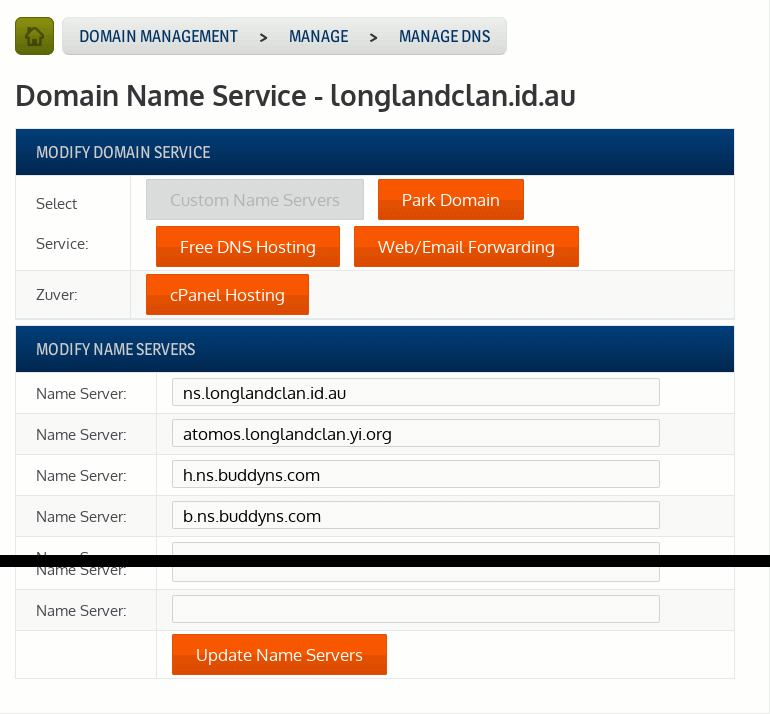
BuddyNS was fairly simple to set up (once BIND worked). You basically sign up, pick out two of their DNS servers and submit those to your registrar as the authorative servers for your domain. I ended up picking two DNS servers, one in the US and one in Adelaide. I also added in an alias to my host using my old yi.org domain.

Adding nameservers

Adding nameservers

Working again

After doing that, my domain worked again, and DNSSEC seemed to be working. There are a few tools you can use to test it.

Updating the zone later

If for whatever reason you wish to update the zone, you need to sign it again. In fact, you’ll need to sign it periodically as the signatures expire. To do this:

$ zonesigner longlandclan.id.au

Note the lack of -genkeys.

My advice to people trying DNSSEC

Before proceeding, make sure you know how to set up a DNS server so you can pull yourself out of the crap if it comes your way. Setting this up with some registrars is a one-way street, once you’ve added keys, there’s no removing them or going back, you’re committed.

Once domain signing keys are submitted, the only way to make that domain work will be to publish the signed record sets (RRSIG records) in your domain data, and that will need a DNS server that can host them.