ts-7670

Solar Cluster: Coaxing two supplies to get along

So last post, I mentioned about the installation of the new battery charger, which is fed from 240V mains. Over the last few days this charger has held the batteries at a rock-solid 14.4V. Not once did the batteries drop below that voltage setpoint.

So good in fact, the solar charger does no work at all.

By the way, this is what the install looks like. I promised pictures last post.

That’s the DC end … and the nasty AC end is all sealed up…

I will eventually move this to a spot on the back of the rack, but it can sit here for now.

Ultimately, the proper fix to this will be to have the mains-powered charger power off when the sun is up. On the DC output connector, the two rightmost screw terminals go to an opto-isolator that, when powered, shuts off the charger, putting it into stand-by mode. This was one of the reasons I bought this particular unit. The other was the wide range of voltage adjustment.

The question is when to turn on, and when to go to stand-by. Basically if the following expression is true, then turn off the mains:
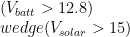
(V_{batt} > 12.8) \\wedge (V_{solar} > 15)

We do not want solar if the battery is very low, as there’s a possibility that the solar output will not be sufficient.  Likewise, if the sun’s out, we need the mains to keep the battery topped up.

The solar output is nearly always above 15V when the sun is up, so there’s our first clue.  We can safely get to 12.8V before things start going pear shaped on the cluster, so we can use that as our low-voltage safety net.  If both of these conditions are met, then it’s safe to turn off the mains power and rely on solar only.

We need a +5V signal when both these conditions are met.  This very much sounds like the job of a dual-comparator with diode-OR outputs pulling on a 5V pull-up.  Maybe a wee bit of hysteresis on those to prevent flapping, and we should be good.

Unfortunately, to do that, I need to unscrew terminals to feed some wires in.  I don’t feel like doing that just now… we’re packing up to go away for a while, and I think this sort of job can wait until we return.

In the meantime, I’ve done something of a hack.  I mentioned the PSU is adjustable.  I wound Vfloat back to 12V… thus Vboost has gone to 12.8V.  Right now, the mains PSU is showing a green LED, meaning it is in floating mode.

We have good sun right now, and the solar controller is currently boosting the battery.  When the battery gets low, the charging circuitry of the mains PSU should kick in, and bring the battery voltage up, holding it at 12.8V until the sun comes up.  I’ll leave it for now and see how this hack goes.

On other news… I might need to re-consider my NTP server arrangements.  I’m not sure if it’s a quirk of OpenBSD, or of the network here, but it seems OpenNTPD struggles to keep good time.  Never tried using the Advantech PC as a NTP server until now, and I’m also experimenting with using my VPS at Vultr as a NTP server.

http://www.pool.ntp.org/user/Redhatter

Both are drifting like crazy.  I have a GPS module lying around that I might consider hooking up to the TS-7670… perhaps make it a Stratum 1 NTP server on the NTP server pool, then the Advantech can sync to that.

This won’t help the VPS though, and I’m at a loss to explain why a Geode LX800 running on an ADSL link in my laundry, outperforms a VPS in a nicely climate-controlled data centre with gigabit Internet.

But at least now that’s one less job for my aging server.  I’ve also moved mail server duties off the old box onto a VM, so I’ll be looking at the BIOS settings there to see if I can get the box to wake up some time in the evening, let cron run the back-up jobs, then power the whole lot back down again, save some juice.

Solar Cluster: Beware, I’m ARMed

Last night, I got home, having made a detour on my way into work past Jaycar Wooloongabba to replace the faulty PSU.
It was a pretty open-and-shut case, we took it out of the box, plugged it in, and sure enough, no fan.  After the saleswoman asked the advice of a co-worker, it was confirmed that the fan should be running.
It took some digging, but they found a replacement, and so it was boxed up (in the box I supplied, they didn’t have one), and I walked out the door with PSU No. 3.
I had to go straight to work, so took the PSU with me, and that evening, I loaded it into the top box to transport home on the bicycle.
I get home, and it’s first thing on my mind.  I unlock the top box, get it out, and still decked out in my cycling gear, helmet and all (needed the headlight to see down the back of the rack anyway), I get to work.
I put the ring lugs on, plug it into the wall socket and flick the switch.
Nothing.
Toggle the switch on the front, still nothing.
Tried the other socket on the outlet, unplugging the load, still nothing.  Did the 10km trip from Milton to The Gap kill it?
Frustrated, I figure I’ll switch a light on.  Funny… no lights.
I wander into the study… sure enough, the router, modem and switch are dead as doornails.  Wander out to the MDB outside, saw the main breaker was still on, and tried hitting the test button.  Nothing.
I wander back inside, switching the bike helmet for my old hard hat, since it looks as if I’ll need the headlight a bit longer, then take a sticky beak down the road to see if anyone else is facing the same issue.
Sure enough, I look down the street, everyone’s out.
So there goes my second attempt at bootstrapping Gentoo, and my old server’s uptime.
The power did return about an hour or so later.  The PSU was fine, you don’t think of the mains being out as the cause of your problems.
I’ll re-start my build, but I’m not going to lose another build to failing power.  Nope, had enough of that for a joke.
I could have rigged up a UPS to the TS-7670, but I already have one, and it’s in the very rack where it’ll get installed anyway.  Thus, no time like the present to install it.
I’ll have to configure the switch to present the right VLANs to the TS-7670, but once I do that, it’ll be able to take over the role of routing between the management VLAN and the main network.
I didn’t want to do this in a VM because that means exposing the hosts and the VMs to the management VLAN, meaning anyone who managed to compromise a host would have direct access to the BMCs on the other nodes.
This is not a network with high bandwidth demands, and so the TS-7670 with its 100Mbps Ethernet (built into the SoC; not via USB) is an ideal machine for this task.
Having done this, all that’s left to do is to create a 2GB dual-core VM which will receive the contents of the old server, then that server can be shut down, after 8 years of good service.  I’ll keep it around for storing the on-site backups, but now I can keep it asleep and just wake it up with Wake-on-LAN when I want to make a back-up.
This should make a dint in our electricity bill!
Other changes…

  • Looks like we’ll be upgrading the solar with the addition of another 120W panel.
  • I will be hooking up my other network switches, the ADSL router and ADSL modem up to the battery bank on the cluster, just got to get some suitable cable for doing so.
  • I have no faith in this third PSU, so already, I have a MeanWell HEP-600C coming.  We’ll wire up a suicide lead to it, and that can replace the Powertech MP-3089 + Redarc BCDC1225, as the MeanWell has a remote on/off feature I can use to control it.

Solar Cluster: History repeats: another PSU fan bites the dust

Perhaps literally… it has bitten the dust.  Although I wouldn’t call its installed location, dusty.  Once again, the fan in the mains power supply has carked it.

Long-term followers of this project may remember that the last PSU failed the same way.

The reason has me miffed.  All I did with the replacement, was take the PSU out of its box, loosen the two nuts for the terminals, slip the ring lugs for my power lead over the terminals, returned the nuts, plugged it in and turned it on.

While it is running 24×7, there is nothing in the documentation to say this PSU can’t run that way.  This is what the installation looks like.

If it were dusty, I’d expect to be seeing hardware failures in my nodes.

This PSU is barely 4 months old, and earlier this week, the fan started making noises, and requiring percussive maintenance to get started. Tonight, it failed. Completely, no taps on the case will convince it to go.

Now, I need to keep things running until the weekend. I need it to run without burning the house down.

Many moons ago, my father bought a 12V fan for the caravan. Cheap and nasty. It has a slider switch to select between two speeds; “fast” and “slow”, which would be better named “scream like a banshee” and “scream slightly less like a banshee”. The speed reduction is achieved by passing current through a 10W resistor, and achieves maybe a 2% reduction in motor RPM. As you can gather, it proved to be a rather unwelcome room mate, and has seen its last day in the caravan.

This fan, given it runs off 12V, has proven quite handy with the cluster. I’ve got my SB-50 “load” socket hanging out the front of the cluster. A little adaptor to bring that out to a cigarette lighter socket, and I can run it off the cluster batteries. When a build job has gotten a node hot and bothered, sitting this down the bottom of the cluster and aiming it at a node has cooled things down well.

Tonight, it has another task … to try and suck the hot air out of the PSU.

That’s the offending power supply.  A PowerTech MP-3089.  It powers the RedARC BCDC-1225 right above it.  And you can see my kludge around the cooling problem.  Not great, but it should hold for the next 24 hours.

Tomorrow, I think we’ll call past Aspley and pick up another replacement.  I’m leery of another now, but I literally have no choice … I need it now.  Sadly, >250W 12V switchmode PSUs are somewhat rare beasts here in Brisbane.  Altronics don’t sell them that big.  The grinning glasses are no more, and I’m not risking it with the Xantrex charger again.

Long term, I’m already looking at the MeanWell SP-480-12.  This is a PSU module, and will need its own case and mains wiring… but I have no faith in the MP-3089 to not fail and cremate my home of 34 years.

The nice feature of the SP-480-12 is that it does have a remote +12V power-off feature.  Presumably I can drive this with a comparator/output MOSFET, so that when the battery voltage drops below some critical threshold, it kicks in, and when it rises above a high set-point, it drops out.  Simple control, with no MCU involved.  I don’t see a reason to get more fancy than that on the control side, anything more is a liability.

On other news, my gcc build on the TS-7670 failed … so much for the wait.  We’ll try another version and see how we go.

Solar Cluster: Resuming a build

So the house got momentarily power-cycled this morning… I’m at work, minding my own business, next thing the access point emails me this:

Mar 13 09:04:23 Syslogd start up

Now, it only does that for two reasons.  Either someone told it to reboot (not I), or it got hard reset.  Sure enough, log into the old server, and it’s reporting an uptime of 15 minutes.  I get home this evening, and clocks all around are on the blink … literally.

The cluster course is going, power outage?  What power outage?

I did consider wiring up the ADSL modem, router, study switch, and the TS-7670 up to the cluster’s power rails, but haven’t gotten around to doing that.  Alas, I’m not quite there yet.

In any case, even if the TS-7670 had been powered from the solar, I’d have still have temporarily lost the build as the HDD dock I have the hard drive sitting in is mains powered.  It also doesn’t remember its state after a power cycling.  I’d have re-started the build from work, but the HDD remained off when the power came back on.

Never mind.  The downside is now I get to re-start a multi-day build.  The good news though, is that knowing the ebuild file that Portage picked out for compiling gcc; I can resume where it left off.  In this case, it’s using an ebuild from the musl overlay; /root/musl/sys-devel/gcc/gcc-6.4.0-r1.ebuild.

ebuild /root/musl/sys-devel/gcc/gcc-6.4.0-r1.ebuild package will preserve the current working tree and will resume where it was, hopefully without incident.  I’ll be left with a .tbz2; which will be picked up when I run emerge –keep-going -ekv @system.

Solar Cluster: Bootstrapping Gentoo

Well, in my last post I discussed getting OpenADK to build a dev environment on the TS-7670.  I had gotten Gentoo’s Portage installed, and started building packages.

The original plan was to build everything into /tmp/seed, but that requires that all the dependencies are present in the chroot.  They aren’t.  In the end, I decided to go the ill-advised route of compiling Gentoo over the top of OpenADK.

This is an ugly way to do things, but it so far is bearing fruit.  Initially there were some hiccups, and I had to restore some binaries from my OpenADK build tree.  When Gentoo installed python-exec; that broke Portage and I found I had to unpack a Python 2.7 binary I had built earlier then use that to re-install Portage.  I could then continue.

Right now, it’s grinding away at gcc; which was my nemesis from the beginning.  This time though, it successfully built xgcc and xg++; which means it has compiled itself using the OpenADK-supplied gcc; and now is building itself using its self-built binaries.  I think it does two or three passes at this.

If it gets through this, there’s about 65 packages to go after that.  Mostly small ones.  I should be able to do a ROOT=/tmp/seed emerge -ek @system then tar up /tmp/seed and emerge catalyst.  I have some wrapper scripts around Catalyst that I developed back when I was responsible for doing the MIPS stages.  These have been tweaked to do musl builds, and were used to produce these x86 stages.  The same will work for ARMv5.

It might be another week of grinding away, but we should get there. 🙂

Solar Cluster: arm-unknown-linux-musleabi… saga part III

So, after a longish wait… my laptop finally coughed up an image with a C/C++ compiler and almost all the bits necessary to make Gentoo Portage tick.

Almost everything… wget built, but it segfaults on start-up.  No matter, it seems curl works.  We do have an issue though: Portage no longer supports customising the downloader like it used to, or at least I couldn’t see how to do it, it used to be settings in make.conf.

Thankfully, I know shell scripts, and can make my own wget using the working curl:

bash-4.4# cat > /usr/bin/wget
#!/bin/bash

OUT=
while [ $# -gt 0 ]; do
    case "$1" in
        -O) OUT="$2"; shift;;
        -t) shift;;
        -T) shift;;
        --passive-ftp) : ;;
        *) break ;;
    esac
    shift
done

set -ex
curl --progress-bar -o "${OUT}" "$1"

Okay, it’s a little (a lot) braindead, but it beats downloading the lot by hand!

I was able to get Gentoo installed by hand using these instructions.  I have an old 1TB HDD plugged into a USB dock, formatted with a 10GB swap partition and the rest btrfs.  Sure, it’s only USB 2.0, but I’d sooner just put up with some CPU overhead than wear out my eMMC.

Next step; ROOT=/tmp/seed emerge -ev system

Solar Cluster: arm-unknown-linux-musleabi… a saga

So, fun and games with the TS-7670.

At present, I have it up and running:

root@ts7670:~# uname -a
Linux ts7670 4.14.15-vrt-ts7670-00031-g1a006273f907-dirty #2 Sun Jan 28 20:21:08 EST 2018 armv5tejl GNU/Linux

That’s booted up into Debian Stretch right now.  debootstrap did its deed a few days ago on the eMMC, and I was able to boot up this new image.  Today I built a new kernel, and tweaked U-Boot to boot from eMMC.

Thus now the unit can boot without any MicroSD cards fitted.

There’s a lot of bit rot to address.  U-Boot was forked from some time in 2014.  I had a crack at rebasing the code onto current U-Boot, but there’s a lot of clean-up work to do just to get it to compile.  Even the kernel needed some fixes to get the newer devicetree sources to build.

As for getting Gentoo working… I have a cross-compiling toolchain that works.  With it, I’ve been able to compile about 99% of a seed stage needed for catalyst.  The 1% that eludes me, is GCC (compiled to run on ARMv5).  GCC 4.9.4 will try to build, but fails near the end… anything newer will barf complaining that my C++ compiler is not working.  Utter bollocks, both AMD64 and ARM toolchains have working C++ compilers, just it’s looking for a binary called “g++” rather than being specific about which one.  I suspect it wants the AMD64 g++, but then if I symlink that to /usr/bin/g++, it throws in ARM CFLAGS, and AMD64 g++ barfs on those.

I’ve explored other options.  I can compile GCC by hand without C++ support, and this works, but you can’t build modern GCC without a C++ compiler … and people wonder why I don’t like C++ on embedded!

buildroot was my next thought, but as it happens, they’ve stripped out the ability to compile a native GCC on the target.

crosstool-ng is the next logical choice, but I’ll have to fiddle with settings to get the compiler to build.

I’ve also had OpenADK suggested, which may be worth a look.  Other options are OpenEmbedded/Yocto, and Cross Linux from Scratch.  I think for the latter, cross is what I’ll get, this stuff can be infuriatingly difficult.

Solar Cluster: TS-7670 showed up today

So, I now have my little battery monitoring computer.  Shipping wound up being a little more than I was expecting… about US$80… but never mind.  It’s here, arrived safely:

HTLLLLLLLLLLLLLLLLLLLLLLLLLLLLLLLLLLLLLLLLLLLLLLLLLLLLLLLLLLLLLLLLLLLLLLFLC
>> TS-BOOTROM - built Jan 26 2017 12:29:21
>> Copyright (c) 2013, Technologic Systems
LLCLLLLLLLFLCLLJUncompressing Linux... done, booting the kernel.
/ts/fastboot file present.  Booting to initramfs instead
Booted from eMMC in 3.15s
Initramfs Web Interface: http://ts7670-498476.local
Total RAM: 128MB
# exit
INIT: version 2.88 booting
[info] Using makefile-style concurrent boot in runlevel S.
[ ok ] Starting the hotplug events dispatcher: udevd.
[ ok ] Synthesizing the initial hotplug events...done.
[ ok ] Waiting for /dev to be fully populated...done.
[ ok ] Activating swap...done.
[....] Checking root file system...fsck from util-linux 2.20.1
e2fsck 1.42.5 (29-Jul-2012)
/dev/mmcblk2p2: clean, 48540/117600 files, 282972/469760 blocks
done.
[ ok ] Cleaning up temporary files... /tmp /lib/init/rw.
…
ts7670-498476 login: root
Linux ts7670-498476 2.6.35.3-571-gcca29a0+ #1 PREEMPT Mon Nov 27 11:05:10 PST 2017 armv5tejl
TS Root Image 2017-11-27

The programs included with the Debian GNU/Linux system are free software;
the exact distribution terms for each program are described in the
individual files in /usr/share/doc/*/copyright.

Debian GNU/Linux comes with ABSOLUTELY NO WARRANTY, to the extent
permitted by applicable law.

root@ts7670-498476:~# 

The on-board 2GB eMMC has a version of Debian Wheezy on it.  That’ll be going very soon.  For now, all I’ve done is pop the cover, shove a 8GB MicroSD card into one of the on-board slots, wired up a 12V power brick temporarily to the unit, hooked a USB cable into the console port (/dev/ttyAMA0 is wired up to an on-board CP2103 USB-serial chip) and verified that it is alive.

Next step will be to bootstrap Gentoo.  I could use standard ARMv5 stages, or I can build my own, which I might do.  I’ve done this before for mips64el n64 using glibc.  Modern glibc is a goliath on a machine with 128MB RAM though, so I’ll be looking at either µClibc/µClibc-ng or musl… most likely the latter.

That said, 20 years ago, we had the same computing power in a desktop. 🙂

I have a few options for interfacing to the power meters…

  • I²C, SPI, a number of GPIOs and a spare UART on a 2.54mm header inside the case.
  • Another spare UART on the footprint for the GPS module (which my unit does not have)
  • Two RS-232 serial ports with RTS/CTS control lines, exposed via RJ-45 jacks
  • Two CANbus ports on a single RJ-45 jack
  • RS-485 on a port marked “Modbus”

In theory, I could just skip the LPC810s and hook this up directly to the INA219Bs.  I’d have to double check what the TTL voltage is… Freescale love their 1.8V logic… but shifting that up to 3.3V or 5V is not hard.  The run is a little longer than I’m comfortable running I²C though.

The LPC810s don’t feature CANbus, so I think my original plan of doing Modbus is going to be the winner.  I can either do a single-ended UART using a resistor/diode in parallel to link RX and TX to the one UART line, or use RS-485.

I’m leaning towards the latter, if I decide to buy a little mains energy meter to monitor power, I can use the same RS-485 link to poll that.  I have some RS-485 transceivers coming for that.

For now though, I’ll at least get Debian Stretch going… this should not be difficult, as I’ll just use the images I’ve built for work to get things going.  I’m downloading a Jessie image now:

root@ts7670-498476:~# curl https://bne.vrt.com.au/technologicsys/ts7670d-jessie-4.4.1-20160226.dd.xz | xzcat | dd of=/dev/mmcblk0 
  % Total    % Received % Xferd  Average Speed   Time    Time     Time  Current
                                 Dload  Upload   Total   Spent    Left  Speed
  0  113M    0  544k    0     0   114k      0  0:16:48  0:00:04  0:16:44  116k

Once that is done, I can reboot, re-format the eMMC and get debootstrap going.  I might even publish an updated image while I’m at it.

Solar Cluster: 2 days and counting on solar…

So, I’m home now for the Christmas break… and the fan in my power supply decided it would take a Christmas break itself.

The power supply was purchased brand new in June… it still works as a power supply, but with the fan seized up, it represents an overheating risk.  Unfortunately, the only real options I have are the Xantrex charger, which cooked my last batteries, or a 12V 20A linear PSU I normally use for my radio station.  20A is just a touch light-on, given the DC-DC converter draws 25A.  It’ll be fine to provide a top-up, but I wouldn’t want to use it for charging up flat batteries.

Now, I can replace the faulty fan.  However, that PSU is under warranty still, so I figure, back it goes!

In the meantime, an experiment.  What happens if I just turn the mains off and rely on the batteries?  Well, so far, so good.  Saturday afternoon, the batteries were fully charged, I unplugged the mains supply.  Battery voltage around 13.8V.

Sunday morning, battery was down to 12.1V, with about 1A coming in off the panels around 7AM (so 6A being drained from batteries by the cluster).

By 10AM, the solar panels were in full swing, and a good 15A was being pumped in, with the cluster drawing no more than 8A.  The batteries finished the day around 13.1V.

This morning, batteries were slightly lower at 11.9V.   Just checking now, I’m seeing over 16A flowing in from the panels, and the battery is at 13.2V.

I’m in the process of building some power meters based on NXP LPC810s and TI INA219Bs.  I’m at two minds what to use to poll them, whether I use a Raspberry Pi I have spare and buy a case, PSU and some sort of serial interface for it… or whether I purchase a small industrial PC for the job.

The Technologic Systems TS-7670 is one that I am considering, given they’ll work over a wide range of voltages and temperatures, they have plenty of UARTs including RS-485 and RS-232, and while they ship with an old Linux kernel, yours truly has ported both U-Boot and the mainline Linux kernel.  Yes, it’s ARMv5, but it doesn’t need to be a speed demon to capture lots of data, and they work just fine for Barangaroo where they poll Modbus (via pymodbus) and M-bus (via python-mbus).