security

Windows 10 shenanigans

Well, it seems the updates to Microsoft’s latest aren’t going as its maker planned. A few people have asked me about my personal opinion of this OS, and I’ll admit, I have no direct experience with it.  I also haven’t had much contact with Windows 8 either.

That said, I do keep up with the news, and a few things do concern me.

The good news

It’s not all bad of course.  Windows 8 saw a big shrink in the footprint of a typical Windows install, and Windows 10 continues to be fairly lightweight.  The UI disaster from Windows 8 has been somewhat pared back to provide a more traditional desktop with a start menu that combines features from the start screen.

There are some limitations with the new start menu, but from what I understand, it behaves mostly like the one from Windows 7.  The tiled section still has some rough edges though, something that is likely to be addressed in future updates of Windows 10.

If this is all that had changed though, I’d be happily accepting it.  Sadly, this is not the case.

Rolling-release updates

Windows has, since day one, been on a long-term support release model.  That is, they bring out a release, then they support it for X years.  Windows XP was released in 2002 and was supported until last year for example.  Windows Vista is still on extended support, and Windows 7 will enter extended support soon.

Now, in the Linux world, we’ve had both long-term support releases and rolling release distributions for years.  Most of the current Linux users know about it, and the distribution makers have had many years to get it right.  Ubuntu have been doing this since 2004, Debian since 1998 and Red Hat since 1994.  Rolling releases can be a bumpy ride if not managed correctly, which is why the long-term support releases exist.  The community has recognised the need, and meets it accordingly.

Ubuntu are even predictable with their releases.  They release on a schedule.  Anything not ready for release is pushed back to the next release.  They do a release every 6 months, in April and October and every 2 years, the April release is a long-term support release.  That is; 8.04, 10.04, 12.04, 14.04 are all LTS releases.  The LTS releases get supported for about 3 years, the regular releases about 18 months.

Debian releases are basically LTS, unless you run Debian Testing or Debian Unstable.  Then you’re running rolling-release.

Some distributions like Gentoo are always rolling-release.  I’ve been running Gentoo for more than 10 years now, and I find the rolling releases rarely give me problems.  We’ve had our hiccups, but these days, things are smooth.  Updating an older Gentoo box to the latest release used to be a fight, but these days, is comparatively painless.

It took most of that 10 years to get to that point, and this is where I worry about Microsoft forcing the vast majority of Windows users onto a rolling-release model, as they will be doing this for the first time.  As I understand it, there will be four branches:

  1. Windows Insiders programme is like Debian Unstable.  The very latest features are pushed out to them first.  They are effectively running a beta version of Windows, and can expect many updates, many breakages, lots of things changing.  For some users, this will be fine, others it’ll be a headache.  There’s no option to skip updates, but you probably will have the option of resigning from the Windows Insiders programme.
  2. Home users basically get something like Debian Testing.  After updates have been thrashed out by the insiders, it gets force-fed to the general public.  The Home version of Windows 10 will not have an option to defer an update.
  3. Professional users get something more like the standard releases of Debian.  They’ll have the option of deferring an update for up to 30 days, so things can change less frequently.  It’s still rolling-release, but they can at least plan their updates to take place once a month, hopefully without disrupting too much.
  4. Enterprise users get something like the old-stable release of Debian.  Security updates, and they have the option to defer updates for a year.

Enterprise isn’t available unless you’re a large company buying lots of licenses.  If people must buy a Windows 10 machine, my recommendation would be to go for the professional version, then you have some right of veto, as not all the updates a purely security-related, some will be changing the UI and adding/removing features.

I can see this being a major headache though for anyone who has to support hardware or software on Windows 10 however, since it’s essentially the build number that becomes important: different release builds will behave differently.  Possibly different enough that things need much more testing and maintenance than what vendors are used to.

Some are very poor at supporting Linux right now due to the rolling-release model of things like the Linux kernel, so I can see Windows 10 being a nightmare for some.

Privacy concerns

One of the big issues to be raised with Windows 10 is the inclusion of telemetry to “improve the user experience” and other features that are seen as an invasion of privacy.  Many things can be turned off, but it will take someone who’s familiar with the OS or good at researching the problem to turn them off.

Probably the biggest concern from my prospective as a network administrator is the WiFi Sense feature.  This is a feature in Windows 10 (and Windows 8 Phone), turned on by default, that allows you to share WiFi passwords with other contacts.

If one of that person’s contacts then comes into range of your AP, their device contacts Microsoft’s servers which have the password on file, and can provide it to that person’s device (hopefully in a secured manner).  The password is never shown to the user themselves, but I believe it’s only a matter of time before someone figures out how to retrieve that password from WiFi Sense.  (A rogue AP would probably do the trick.)

We have discussed this at work where we have two WiFi networks: one WPA2 enterprise one for staff, and a WPA2 Personal one for guests.  Since we cannot control whether the users have this feature turned on or not, or whether they might accidentally “share” the password with world + dog, we’re considering two options:

  1. Banning the use of Windows 10 devices (and Windows 8 Phone) from being used on our guest WiFi network.
  2. Implementing a cron job to regularly change the guest WiFi password.  (The Cisco AP we have can be hit with SSH; automating this shouldn’t be difficult.)

There are some nasty points in the end user license agreement too that seem to give Microsoft free reign to make copies of any of the data on the system.  They say personal information will be removed, but even with the best of intentions, it is likely that some personal information will get caught in the net cast by telemetry software.

Forced “upgrades” to Windows 10

This is the bit about Windows 10 that really bugs me.  Okay, Microsoft is pushing a deal where they’ll provide it to you for free for a year.  Free upgrades, yaay!  But wait: how do you know if your hardware and software is compatible?  Maybe you’re not ready to jump on the bandwagon just yet, or maybe you’ve heard news about the privacy issues or rolling release updates and decided to hold back.

Many users of Windows 7, 8 and 8.1 are now being force-fed the new release, whether we asked for it or not.

Now the problem with this is it completely ignores the fact that some do not run with an always-on Internet connection with a large quota.  I know people who only have a 3G connection, with a very small (1GB) quota.  Windows 10 weighs in at nearly 3GB, so for them, they’ll be paying for 2GB worth of overuse charges just for the OS, never mind what web browsing, emailing and other things they might have actually bought their Internet connection for.

Microsoft employees have been outed for showing such contempt before.  It seems so many there are used to the idea of an Internet connection that is always there and has a big enough quota to be considered “unlimited” that they have forgotten that some parts of the world do not have such luxuries.  The computer and the Internet are just tools: we do not buy an Internet connection just for the sake of having one.

Stopping updates

There are a couple of tools that exist for managing this.  I have not tested any of them, and cannot vouch for their safety or reliability.

  • BlockWindows (github link) is a set of scripts that, when executed, uninstall and disable most of the Windows 10-related updates on Windows 7 and 8/8.1.
  • GWX Control Panel is a (proprietary?) tool for controlling the GWX process.  The download is here.

My recommendation is to keep good backups.  Find a tool that will do a raw partition back-up of your Windows partition, and keep your personal files on a separate partition.  Then, if Microsoft does come a-knocking, you can easily roll back.  Hopefully after the “free upgrade” offer has expired (about this time next year), they will cease and desist from this practise.

Fun and games implementing DNSSEC

Well, I just had a “fun” afternoon.  For the past few weeks, the free DNS provider I was using, yi.org, has been unresponsive.  I had sent numerous emails to the administrator of the site, but heard nothing.  Fearing the worst, I decided it was time to move.  I looked around, and found I could get an id.au domain cheaply, so here I am.

I’d like to thank Tyler MacDonald for providing the yi.org service for the last 10 years.  It helped a great deal, and until recently, was a real great service.  I’d still recommend it to people if the site was up.

So, I put the order in on a Saturday, and the domain was brought online on Monday evening.  I slowly moved my Internet estates across to it, and so I had my old URLs redirecting to new ones, the old email address became an alias of the new one, moving mailing list subscriptions over, etc.  Most of the migration would take place this weekend, when I’d set things up proper.

One of the things I thought I’d tackle was DNSSEC.  There are a number of guides, and I followed this one.

Preparations

Before doing anything, I installed dnssec-tools as well as the dependencies, bind-utils and bind. I had to edit some things in /etc/dnssec-tools/dnssec-tools.conf to adjust some paths on Gentoo, and to set preferred signature options (I opted for RSASHA512 signatures, 4096-bit key-signing keys and 2048-bit zone-signing keys).

Getting the zone file

I constructed a zone file using what I could extract using dig:

The following is a dump of more or less what I got. Obviously the nameservers were for my domain registrar initially and not the ones listed here.

$ dig any @192.168.xxx.xxx longlandclan.id.au 
;; Truncated, retrying in TCP mode.

; <<>> DiG 9.10.2-P2 <<>> any @192.168.xxx.xxx longlandclan.id.au
; (1 server found)
;; global options: +cmd
;; Got answer:
;; ->>HEADER<<- opcode: QUERY, status: NOERROR, id: 60996
;; flags: qr aa rd ra; QUERY: 1, ANSWER: 22, AUTHORITY: 0, ADDITIONAL: 10

;; OPT PSEUDOSECTION:
; EDNS: version: 0, flags:; udp: 4096
;; QUESTION SECTION:
;longlandclan.id.au.            IN      ANY

;; ANSWER SECTION:
longlandclan.id.au.     86400   IN      SOA     ns.longlandclan.id.au. stuartl.longlandclan.id.au. 2015091231 10800 3600 604800 3600
longlandclan.id.au.     86400   IN      NS      h.ns.buddyns.com.
longlandclan.id.au.     86400   IN      NS      atomos.longlandclan.yi.org.
longlandclan.id.au.     86400   IN      NS      b.ns.buddyns.com.
longlandclan.id.au.     86400   IN      NS      ns.longlandclan.id.au.
longlandclan.id.au.     3600    IN      A       150.101.176.226
longlandclan.id.au.     3600    IN      MX      10 mail.longlandclan.id.au.
longlandclan.id.au.     3600    IN      TXT     "v=spf1 a a:atomos.longlandclan.id.au ip6:2001:44b8:21ac:7000::/56 ip4:150.101.176.226 a:mail.internode.on.net ~all"
longlandclan.id.au.     3600    IN      AAAA    2001:44b8:21ac:7000::1

;; ADDITIONAL SECTION:
b.ns.buddyns.com.       8439    IN      A       173.244.206.25
h.ns.buddyns.com.       8439    IN      A       119.252.20.56
h.ns.buddyns.com.       170395  IN      AAAA    2401:1400:1:1201:0:1:7853:1a5
ns.longlandclan.id.au.  3600    IN      A       150.101.176.226
ns.longlandclan.id.au.  3600    IN      AAAA    2001:44b8:21ac:7000::1
atomos.longlandclan.yi.org. 86400 IN    A       192.168.5.1
atomos.longlandclan.yi.org. 86400 IN    AAAA    2001:44b8:21ac:7000::1
mail.longlandclan.id.au. 3600   IN      A       150.101.176.226
mail.longlandclan.id.au. 3600   IN      AAAA    2001:44b8:21ac:7000::1

;; Query time: 3 msec
;; SERVER: 192.168.xxx.xxx#53(192.168.xxx.xxx)
;; WHEN: Sat Sep 12 16:40:38 EST 2015
;; MSG SIZE  rcvd: 4715

I needed to translate this into a zone file. If there’s any secret sauce missing, now’s the time to add it. I wound up with a zone file (called longlandclan.id.au) that looked like this:

$TTL 3600
$ORIGIN longlandclan.id.au.
@	86400	IN	SOA	ns.longlandclan.id.au. stuartl.longlandclan.id.au. (2015091231 10800 3600 604800 3600 )
@	86400   IN      NS      ns.longlandclan.id.au.
@	86400   IN      NS      atomos.longlandclan.yi.org.
@	86400   IN      NS      h.ns.buddyns.com.
@	86400   IN      NS      b.ns.buddyns.com.
@	3600	IN	MX	10 mail.longlandclan.id.au.
@	3600	IN	TXT	"v=spf1 a a:atomos.longlandclan.id.au ip6:2001:44b8:21ac:7000::/56 ip4:150.101.176.226 a:mail.internode.on.net ~all"
@	3600	IN	A	150.101.176.226
@	3600	IN	AAAA	2001:44b8:21ac:7000::1
atomos	3600	IN	A	150.101.176.226
atomos	3600	IN	AAAA	2001:44b8:21ac:7000::1
mail	3600	IN	A	150.101.176.226
mail	3600	IN	AAAA	2001:44b8:21ac:7000::1
ns	3600	IN	A	150.101.176.226
ns	3600	IN	AAAA	2001:44b8:21ac:7000::1
*	3600	IN	A	150.101.176.226
*	3600	IN	AAAA	2001:44b8:21ac:7000::1

Signing the zone

Next step, is to create domain keys and sign it.

$ zonesigner -genkeys longlandclan.id.au

This generates a heap of files. Apart from the keys themselves, two are important as far as your DNS server are concerned: dsset-longlandclan.id.au. and longlandclan.id.au.signed. The former contains the DS keys that you’ll need to give to your regristrar, the latter is what your DNS server needs to serve up.

Updating DNS

I figured the safest bet was to add the domain records first, then come back and do the DS keys since there’s a warning that messing with those can break the domain. At this time I had Zuver (my registrar) hosting my DNS, so over I trundle to add a record to the zone, except I discover that there aren’t any options there to add the needed records.

Okay, maybe they’ll appear when I add the DS keys“, I think. Their DS key form looks like this:

Zuver's DS Key Data form

Zuver’s DS Key Data form

dsset-longlandclan.id.au. for me looked like this:

longlandclan.id.au.     IN DS 12345 10 1 7AB4...
longlandclan.id.au.     IN DS 12345 10 2 DE02...

Turns out, the 12345 goes by a number of names, such as key ID and in the Zuver interface, key tag.  So in they went.  The record literally is in the form:

${DOMAIN} IN DS ${KEY_ID} ${ALGO} ${DIGEST_TYPE} ${DIGEST}

The digest, if it has spaces, is to be entered without spaces.

Oops, I broke it!

So having added these keys, I note (as I thought might happen), the domain stopped working. I found I still couldn’t add the records, so I had to now move (quickly) my DNS over to another DNS server. One that permitted these kinds of records. I figured I’d do it myself, and get someone to act as a secondary.

First step was to take that longlandclan.id.au.signed file and throw it into the bind server’s data directory and point named.conf at it. To make sure you can hook a slave to it, create a ACL rule that will match the IP addresses of your possible slaves, and add that to the allow-transfer option for the zone:

acl buddyns {
        173.244.206.26;
        88.198.106.11;
        2607:f0d0:1005:72::100;
        2a01:4f8:d12:d01::10:100;
};
acl stuartslan { ... };

zone "longlandclan.id.au" IN {
        type master;
        file "pri/longlandclan.id.au.signed";
        allow-transfer { buddyns; localhost; stuartslan; };
        allow-query { any; };
        allow-update { localhost; stuartslan; };
        notify no;
};

Make sure that from another machine in your network, you can run dig +tcp axfr @${DNS_IP} ${DOMAIN} and get a full listing of your domain’s contents.

I really needed a slave DNS server and so went looking around, found one in BuddyNS. I then spent the next few hours arguing with bind as to whether it was authoritative for the domain or not. Long story short, make sure when you re-start bind, that you re-start ALL instances of it. In my case I found there was a rogue instance running with the old configuration.

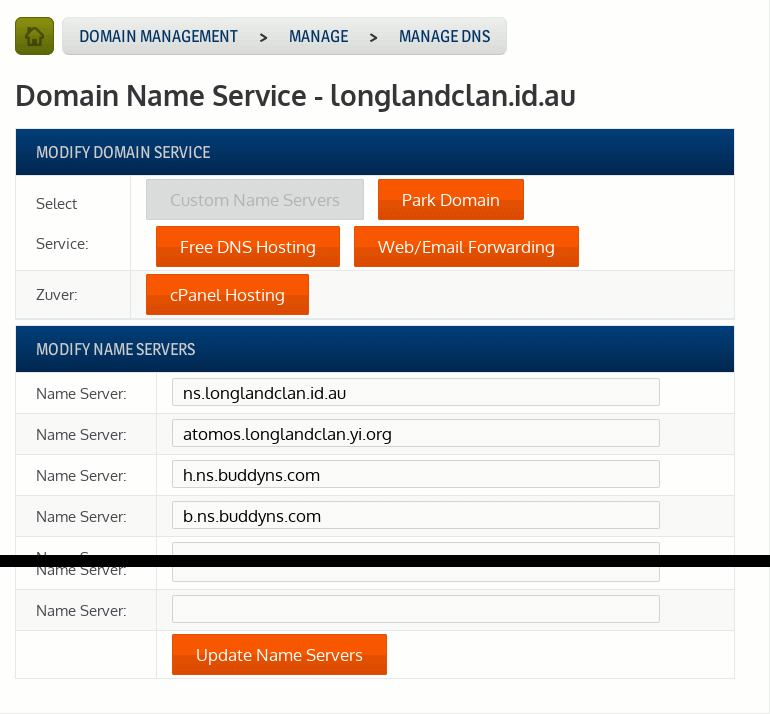
BuddyNS was fairly simple to set up (once BIND worked). You basically sign up, pick out two of their DNS servers and submit those to your registrar as the authorative servers for your domain. I ended up picking two DNS servers, one in the US and one in Adelaide. I also added in an alias to my host using my old yi.org domain.

Adding nameservers

Adding nameservers

Working again

After doing that, my domain worked again, and DNSSEC seemed to be working. There are a few tools you can use to test it.

Updating the zone later

If for whatever reason you wish to update the zone, you need to sign it again. In fact, you’ll need to sign it periodically as the signatures expire. To do this:

$ zonesigner longlandclan.id.au

Note the lack of -genkeys.

My advice to people trying DNSSEC

Before proceeding, make sure you know how to set up a DNS server so you can pull yourself out of the crap if it comes your way. Setting this up with some registrars is a one-way street, once you’ve added keys, there’s no removing them or going back, you’re committed.

Once domain signing keys are submitted, the only way to make that domain work will be to publish the signed record sets (RRSIG records) in your domain data, and that will need a DNS server that can host them.

Experimenting with S/MIME

I’ve been a long time user of PGP, had a keypair since about 2003.  OpenPGP has some nice advantages in that it’s a more social arrangement in that verification is done by physically meeting people.  I think it is more personal that way.

However, you still can get isolated islands, my old key was a branch of the strong set, having been signed by one person who did do a lot of key-signing, but sadly thanks to Heartbleed, I couldn’t trust it anymore.  So I’ve had to start anew.

The alternate way to ensure communications is to use some third party like a certificate authority and use S/MIME.  This is the other side of the coin, where a company verifies who you are.  The company is then entrusted to do their job properly.  If you trust the company’s certificate in your web browser or email client, you implicitly trust every non-revoked valid certificate that company has signed.  As such, there is a proliferation of companies that act as a CA, and a typical web browser will come with a list as long as your arm/leg/whatever.

I’ve just set up one such certificate for myself, using StartCOM‘s CA as the authority.  If you trust StartCOM, and want my GPG key, you’ll find a S/MIME signed email with my key here.  If you instead trust my GPG signature and want my S/MIME public key, you can get that here.  If you want to throw caution to the wind, you can get the bare GPG key or S/MIME public key instead.

Update: I noticed GnuPG 2.1 has been released, so I now have an ECDSA key; fingerprint B8AA 34BA 25C7 9416 8FAE  F315 A024 04BC 5865 0CF9.  You may use it or my existing RSA key if your software doesn’t support ECDSA.